Scrapbooks
What to Do With Guest Photos After Your Event
Turn guest photos, candid moments, and host-added memories into a digital scrapbook that feels easier to save, share, and revisit.
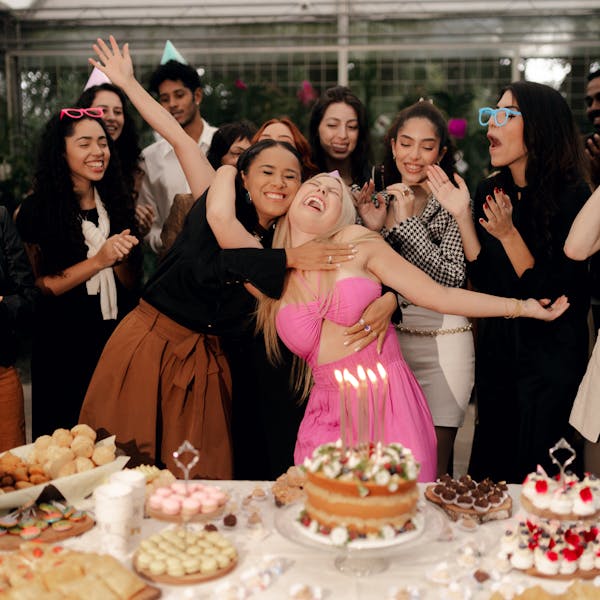
After an event, most photos end up scattered across phones, group texts, camera rolls, shared albums, and forgotten message threads.
A few people send their favorites. A few post to social media. A few never send anything at all.
But when guests help capture the event through a Memory Hunt, you end up with something better than a random pile of photos. You get a gallery full of candid moments, different perspectives, funny details, and little memories you may have missed while hosting.
The next step is turning those photos into something worth keeping.
That is where a digital scrapbook comes in.
Why a digital scrapbook works so well after an event
A regular photo gallery is useful, but it can also feel overwhelming.
You may have dozens, hundreds, or even thousands of photos after a big event. Some are great. Some are duplicates. Some are blurry. Some are funny but only make sense in context.
A digital scrapbook helps you turn the best photos into a more finished keepsake.
Instead of asking, “Where did all those photos go?” you can create one simple place that captures the feeling of the day.
A good digital scrapbook is not about saving every single image. It is about choosing the moments that tell the story best.
Start with the candid moments
The best event memories are often not the perfectly posed ones.
They are the photos of people laughing at a table, kids running around in the background, someone reacting to a speech, friends dancing, family members hugging, or a quiet detail that would have been easy to miss.
These candid photos are what make a scrapbook feel personal.
When reviewing your gallery, look for photos that show:
- Real reactions
- Small details
- People enjoying themselves
- Behind-the-scenes moments
- Funny or unexpected memories
- Guests interacting naturally
These are often the photos you will want to revisit years later.
Mix guest photos with your own
Guest photos are powerful because they show the event from different angles.
As the host, you only experience one version of the day. Your guests see everything else: the tables, the dance floor, the food, the side conversations, the decorations, the kids, the group moments, and the things happening while you are busy hosting.
A strong digital scrapbook usually works best when it mixes:
- Guest-submitted prompt photos
- Extra Memories guests added on their own
- Your favorite personal photos
- A few detail shots
- A few group photos
- A few emotional or funny moments
That mix makes the scrapbook feel complete without needing to include every photo from the event.
Choose the best, not the most
It can be tempting to include everything, especially when people took the time to upload photos.
But a scrapbook is better when it feels curated.
Instead of including 200 similar photos, choose the ones that feel different from each other. Pick photos that each add something to the story.
A simple approach:
- Favorite every photo you immediately love.
- Remove blurry or duplicate photos.
- Look for variety across guests, groups, and moments.
- Add a few of your own photos if something important is missing.
- Build the scrapbook from the strongest memories.
The goal is not to make a perfect archive. The goal is to create something people actually want to look through.
Organize the scrapbook around moments
A digital scrapbook feels more intentional when it has a little structure.
You do not need complicated chapters or a full design process. A few simple sections can make the whole keepsake easier to enjoy.
For example:
Event Highlights
Use this section for the biggest, happiest, most memorable photos.
Guest Moments
Include photos guests captured from their tables, groups, or point of view.
Funny Memories
Save the laughs, silly faces, unexpected poses, and moments that feel very specific to your event.
Details
Include decorations, food, flowers, signs, outfits, dessert tables, or anything that helped make the event feel special.
Extra Memories
Use this section for the photos guests uploaded outside their assigned prompts. These are often some of the most natural memories.
You do not need every event to follow the same structure. The best scrapbook layout is the one that makes the memories easy to revisit.
Keep it easy to share
One of the best parts of a digital scrapbook is that it is easy to share after the event.
Instead of sending dozens of separate photos, you can share one keepsake link with close family, friends, or the people who helped make the event special.
This is especially useful for:
- Weddings
- Birthdays
- Baby showers
- Graduations
- Family reunions
- Holiday parties
- Team events
A digital scrapbook gives people a simple way to revisit the event without scrolling through a giant photo dump.
Do not wait too long
The best time to build a scrapbook is shortly after the event.
That is when the memories are still fresh, the favorite photos are easy to recognize, and you still remember the little stories behind them.
A good rule of thumb:
- Review the gallery within a few days.
- Favorite the best photos while the event is fresh.
- Remove anything you do not want to keep.
- Add any missing photos from your own camera roll.
- Build the scrapbook before the gallery gets forgotten.
The longer you wait, the easier it is for the photos to become just another folder you meant to organize later.
Make the event easier to remember
A digital scrapbook turns guest photos into something more meaningful than a collection of uploads.
It gives the event a beginning, middle, and feeling. It helps you save the moments that mattered most. And it makes it easier to share the memories with the people who were part of them.
With Memory Hunt, guests help capture the event through photo prompts and Extra Memories. Afterward, you can favorite the moments you love, add your own photos, and turn everything into a digital keepsake.
The event may only last a day.
The memories should be easier to keep.